
Menu

Shop

Region & Language

BlogVedron

A revenue dashboard that quietly approximates currency conversion is worse than no dashboard at all, because it looks authoritative while being wrong. If you sell in EUR, PLN, GBP, and USD, "total revenue" only means something if every order was converted at the exchange rate that actually applied on its transaction date -- not today's rate applied retroactively to everything.

What a real revenue/product analysis view needs

Three things: a breakdown by product and by revenue source that's actually useful for decisions (not just a single total), correct multi-currency conversion applied consistently rather than approximated, and access control that respects company boundaries when a tenant runs more than one company or brand.

How Vedron handles this

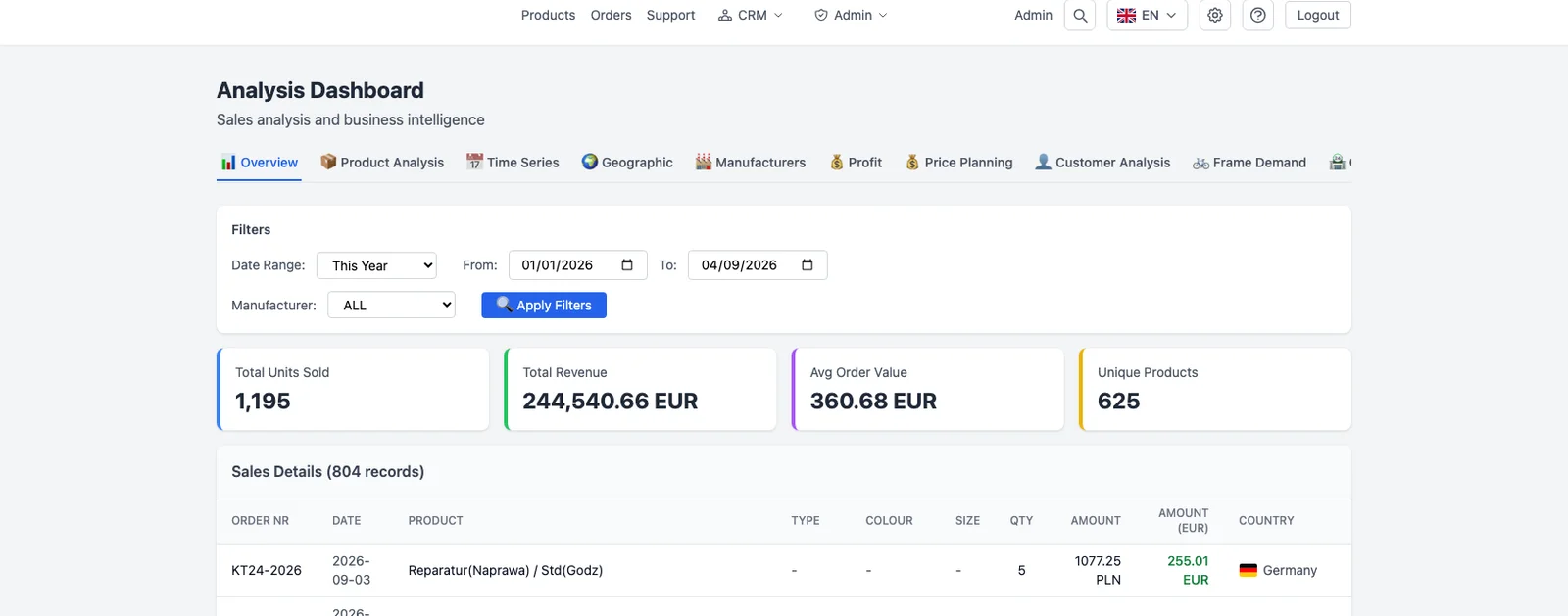
Vedron's analysis module provides revenue and product breakdowns computed directly from order data, with multi-currency amounts converted via a live exchange-rate join against ECB reference rates matched to each transaction's actual date -- not a single blanket rate applied across the board. Access is scoped per company, so a multi-company tenant sees each company's own breakdown rather than a blended, ambiguous total.

Worth being direct about scope: this is a real, built-in revenue/product analysis view -- it is not a general-purpose, self-serve report builder where you construct arbitrary custom queries yourself. For genuinely bespoke reporting needs (we've built one-off examples like a supplier-payables tracker for a specific set of vendors), that's custom work built on top of the same underlying data model, not something every user configures themselves out of the box today.

Frequently asked questions

Can I build my own custom report without engineering involvement?

Not today as a self-serve builder -- the built-in analysis module covers revenue and product breakdowns; anything beyond that (like a bespoke supplier-specific report) is custom work on the same data, not a drag-and-drop report designer.

Does the currency conversion affect VAT reporting too, or just the dashboard?

The same date-matched exchange-rate principle applies wherever revenue crosses into reporting that requires accurate historical rates, including VAT calculation -- see the dedicated post on multi-currency selling for that side specifically.

What happens if I run multiple companies under one account?

Analysis is scoped per company, so each company's revenue and product breakdown is kept separate rather than merged into one ambiguous figure.

Have a question specific to your setup?

Every seller's marketplace mix and stock setup is a little different -- if you're weighing this against your own, book a short call and we'll walk through it with you directly rather than leaving you to figure it out from a blog post alone.

Beta offer: if you join as a beta client, custom integration setup -- configured for your actual marketplace and inventory mix -- is free for your first 2 months.

Still evaluating and need more time than the standard trial window? Just ask us for an extension -- we're happy to give you the room to actually test it properly before deciding.

Book a call or see plans and get started.

All posts

Revenue and Product Analysis Built on Real Multi-Currency Data

05. Mai 20263 min read

A revenue dashboard that quietly approximates currency conversion is worse than no dashboard at all, because it looks authoritative while being wrong. If you sell in EUR, PLN, GBP, and USD, "total revenue" only means something if every order was converted at the exchange rate that actually applied on its transaction date -- not today's rate applied retroactively to everything.

What a real revenue/product analysis view needs

Three things: a breakdown by product and by revenue source that's actually useful for decisions (not just a single total), correct multi-currency conversion applied consistently rather than approximated, and access control that respects company boundaries when a tenant runs more than one company or brand.

How Vedron handles this

Vedron's analysis module provides revenue and product breakdowns computed directly from order data, with multi-currency amounts converted via a live exchange-rate join against ECB reference rates matched to each transaction's actual date -- not a single blanket rate applied across the board. Access is scoped per company, so a multi-company tenant sees each company's own breakdown rather than a blended, ambiguous total.

Worth being direct about scope: this is a real, built-in revenue/product analysis view -- it is not a general-purpose, self-serve report builder where you construct arbitrary custom queries yourself. For genuinely bespoke reporting needs (we've built one-off examples like a supplier-payables tracker for a specific set of vendors), that's custom work built on top of the same underlying data model, not something every user configures themselves out of the box today.

Frequently asked questions

Can I build my own custom report without engineering involvement?

Not today as a self-serve builder -- the built-in analysis module covers revenue and product breakdowns; anything beyond that (like a bespoke supplier-specific report) is custom work on the same data, not a drag-and-drop report designer.

Does the currency conversion affect VAT reporting too, or just the dashboard?

The same date-matched exchange-rate principle applies wherever revenue crosses into reporting that requires accurate historical rates, including VAT calculation -- see the dedicated post on multi-currency selling for that side specifically.

What happens if I run multiple companies under one account?

Analysis is scoped per company, so each company's revenue and product breakdown is kept separate rather than merged into one ambiguous figure.

Have a question specific to your setup?

Every seller's marketplace mix and stock setup is a little different -- if you're weighing this against your own, book a short call and we'll walk through it with you directly rather than leaving you to figure it out from a blog post alone.

Beta offer: if you join as a beta client, custom integration setup -- configured for your actual marketplace and inventory mix -- is free for your first 2 months.

Still evaluating and need more time than the standard trial window? Just ask us for an extension -- we're happy to give you the room to actually test it properly before deciding.

Book a call or see plans and get started.

Did you enjoy this article?